
FIELD NOTES /
Windows Internals:使用者模式與核心邊界
從 PE 載入、Process/Thread、虛擬記憶體到 syscall 分派,建立可用於逆向與除錯的 Windows 執行模型。
為什麼要讀 Windows Internals?
做逆向工程、事件調查、驅動開發或效能診斷時,只知道 Win32 API 的名稱並不夠。真正有用的是能把一個行為沿著系統層次往下追:哪個 process 發起、哪條 thread 執行、哪段 virtual memory 被存取、哪個 kernel object 被引用,最後由哪個 system service 完成。
Microsoft 對 process 的定義不只是「一個正在執行的程式」:它同時包含私有虛擬位址空間、可執行程式碼、開啟的 object handle、安全權杖、環境資訊、優先權與至少一條 thread。真正被 scheduler 排程的是 thread,而不是 process。
先建立五張彼此相連的地圖:
- 執行地圖:Process、Thread、Job Object、Token。
- 載入地圖:PE、Section、Loader、PEB/TEB、模組鏈。
- 記憶體地圖:Virtual Address、VAD、Page Table、Working Set。
- 資源地圖:Handle Table、Object Manager、Namespace。
- 邊界地圖:Win32 API、Native API、System Call、Kernel Service。
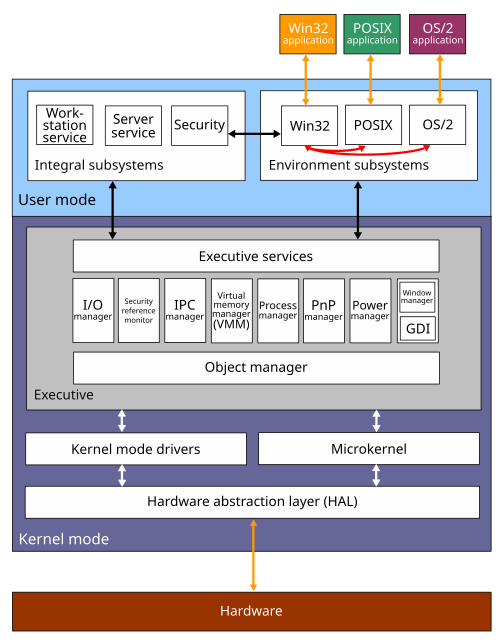
一次 API 呼叫實際經過哪些層?
以檔案開啟為例,應用程式可能呼叫 CreateFileW。Win32 層先整理參數,再進入 ntdll.dll 的 Native API,最後經 system call 切換到 kernel mode。Kernel 端的 Object Manager 與 I/O Manager 解析名稱、檢查權限、建立或引用 file object,再把要求送往 file-system 與 storage stack。
Application
  → KernelBase / Kernel32:Win32 參數與相容層
    → Ntdll:Native API(例如 NtCreateFile)
      → System-call transition
        → Executive service
          → Object Manager / Security Reference Monitor
          → I/O Manager / File-system driver
這條鏈帶來三個分析原則:
- API 名稱不等於最終行為。 不同 Win32 API 可能收斂到同一組 Native API。
- User-mode hook 只看得到部分路徑。 直接呼叫 Native API 會改變觀測結果。
- Kernel telemetry 也不是完整真相。 ETW、minifilter、callback 與 EDR sensor 各自只覆蓋特定層次,必須交叉驗證。
Process 建立:不只是載入一個 EXE
典型建立流程可簡化為:
CreateProcessW
  → CreateProcessInternalW
    → NtCreateUserProcess
      → 建立 process / initial thread kernel objects
      → 建立或對映 image section
      → 準備 address space、PEB、TEB、stack 與 parameters
      → user-mode loader 初始化
      → TLS callbacks / DLL initialization
      → image entry point
這不是穩定 ABI 的逐函式保證,而是分析用心智模型。內部函式名稱與細節會隨 Windows build 改變;可依賴的是「建立核心物件、建立位址空間、對映 image、初始化執行環境、啟動第一條 thread」這幾個階段。
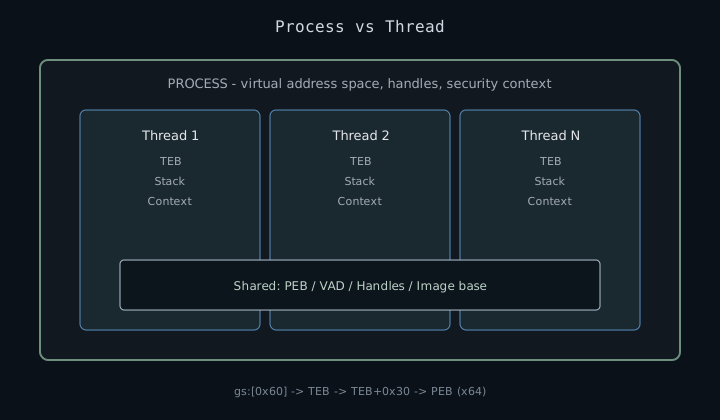
Process、Thread 與 Job Object
| 元件 | 主要責任 | 常見分析問題 |
|---|---|---|
| Process | 位址空間、handle table、token、載入模組 | Image path 是否可信?Token 是否異常?父子關係是否合理? |
| Thread | CPU context、兩種 stack、TEB、排程狀態 | Start address 在哪?正在 wait 還是 running?Call stack 是否跨入未知記憶體? |
| Job Object | 將多個 process 作為群組管理與限制 | 是否有 CPU/記憶體限制?Process 是否被 sandbox 或 container 管理? |
| Access Token | SID、group、privilege、integrity level | 權限來自原 process 還是 impersonation?敏感 privilege 是否啟用? |
PEB、TEB 與 Loader 狀態
PEB 保存 process 級 user-mode 狀態,包括 loader data、process parameters 與 heap 資訊;TEB 保存 thread 級狀態,包括 stack boundary、TLS、last-error 與 exception 相關欄位。
| 結構 | 範圍 | 常見用途 | 注意事項 |
|---|---|---|---|
| PEB | Process | 模組鏈、命令列、環境、process heap | User mode 可寫,不能單獨視為可信安全證據 |
| TEB | Thread | StackBase/StackLimit、TLS、LastErrorValue | 每條 thread 各有一份 |
| EPROCESS | Kernel | Token、handle table、address-space metadata | Layout 隨版本變動,應以 symbols 解析 |
| ETHREAD / KTHREAD | Kernel | Wait、priority、kernel stack | 不要把固定 offset 套到其他 build |
在 x64 Windows,GS base 指向目前 thread 的 TEB,而 gs:[0x60] 是 TEB 內保存的 PEB 指標。這句話常被簡寫成「gs:[0x60] 是 PEB」,但兩者層次不同。x86 通常透過 FS 存取 TEB;WOW64 還同時牽涉 32-bit 與 64-bit 執行環境。
PEB Walk Lab — 從 gs 到模組鏈
gs:[0x60]0x00000000`0012F000x64 每條 thread 的 TEB 由 gs 段暫存器指向。
Loader list 為什麼不能當唯一答案?
正常 DLL 由 loader 建立 module record,並出現在 PEB loader lists。可是 manual mapping、損壞的 loader state、已卸載但殘留的 mapping,或刻意 unlink 都可能造成「記憶體中有 executable image,但 loader list 沒有它」。因此至少要交叉比對:
- PEB loader list 與工具列出的 modules。
- VAD / memory map 中的
MEM_IMAGE、MEM_MAPPED、MEM_PRIVATE。 - PE header、section alignment 與 executable pages。
- Thread start address、stack return address是否落入未命名區域。
虛擬記憶體:Address Space、VAD 與 Working Set
每個 user-mode process 都有自己的 private virtual address space;kernel-mode code 則共享 system space。Virtual address 不直接等於 physical address,CPU 透過 page tables 完成轉換。這層抽象提供 isolation、稀疏配置、copy-on-write、memory-mapped file 與 paging。
Reserve、Commit 與 Resident 是三件不同的事
| 狀態 | 意義 | 常見誤解 |
|---|---|---|
| Reserved | 保留一段 virtual address range | 不代表已配置實體頁面 |
| Committed | 系統承諾提供 backing storage | 不代表此刻一定在 RAM |
| Working Set | 目前 resident 在 physical memory 的頁面集合 | 被 trim 不代表 allocation 消失 |
VAD 描述一段位址範圍及其 protection、mapping 類型與 backing relationship;page table 則回答「這個 virtual page 目前如何轉譯」。兩者不是同一個資料結構。
Image、Mapped 與 Private
- Image mapping:由 executable image section 支援,通常對應 EXE/DLL。
- Mapped mapping:由 data file 或 shared section 支援。
- Private mapping:heap、stack、一般 allocation 與 copy-on-write 後的 private page 常落在此類。
單看 RWX 或 private executable page 不能直接判定惡意。JIT compiler、相容層與某些保護器也會產生類似區域。更可靠的判斷是把 protection transition、寫入來源、thread start、call stack、signing 與 process role 結合起來。
Pointer Lab — 陣列索引 vs 指標偏移
索引 a = 0
Memory (each int = 4 bytes) — 點 cell 切換 a
當 a = 0 時,*(p + a) 讀到 10,位址 0x100040
int values[4] = { 10, 20, 30, 40 };
int a = 0;

values[a]     → 10
*(values + a) → 10
&values[a]    → 0x100040
可重複的記憶體檢查流程
- 確認目標 process、architecture 與 OS build。
- 列出 modules、mapped files 與 private regions。
- 找 executable private pages 或 image/disk mismatch。
- 檢查 region 內是否有合理 code、PE 結構或 JIT metadata。
- 將 active thread 的 instruction pointer 與 call stack 對回 regions。
- 用 timeline 驗證 allocation、write、protection change 與 execution 的先後關係。
Handle 與 Object Manager
Handle 是 process-local 的間接參照,不是全域 kernel pointer。Process 的 handle table entry 最終引用 Object Manager 管理的 object;object header 保存 type、reference count、name 與 security metadata,body 才是 file、event、process 等型別的實際內容。
User handle
  → process handle table entry
    → object header
      → typed object body
這個模型解釋了幾個常見現象:
- 相同數值的 handle 在不同 process 可指向不同 object。
DuplicateHandle產生另一個 table entry,不是複製底層 object。CloseHandle移除參照;只有最後的 handle 與 kernel reference 都消失後,object 才能銷毀。- Named object 存在 Object Manager namespace;Win32 path 只是另一層轉譯。
System Call:邊界轉換而不是「神祕後門」
在 x64 上,ntdll 的 Native API stub 通常準備 system service number,將第一個參數從 RCX 搬到 R10,再執行 syscall。System service number 不是跨版本穩定 ABI,WOW64 路徑也不同。
; 典型形狀;不應硬編碼版本相依的 service number
mov r10, rcx
mov eax, <service-number>
syscall
ret
Syscall SSN Lab — ntdll stub 裡的 eax
; ntdll!NtReadFile stub (x64, simplified)
mov r10, rcx
mov eax, 0x06          ; SSN
syscall
ret

; x64dbg: 在 NtReadFile 設 breakpoint
; 單步到 mov eax 前後,觀察 eax = 0x00000006
; 讀檔 — I/O Manager 進入點
SSN 隨 Windows build 變動;實務用 sig 或 Hell's Gate 動態解析,不要 hardcode。
進入 kernel mode 後,系統仍會做參數擷取、位址探測、access check 與 object reference。直接執行 system call 不會繞過 kernel security model;它最多改變某些 user-mode 觀測點。
實作:從 live system 到 dump
| 問題 | 工具 | 觀察重點 |
|---|---|---|
| Process 從哪裡來? | Process Explorer、Process Monitor | Parent、command line、token、image path、signer |
| 位址空間長什麼樣? | VMMap、WinDbg | Image / mapped / private、working set、protection |
| Thread 在做什麼? | Process Explorer、WPA、WinDbg | CPU、wait reason、start address、stack |
| Handle 指向什麼? | Process Explorer、WinObj、WinDbg | Type、name、granted access、owner process |
WinDbg user-mode checklist
vertarget          ; 確認目標與 debugger context
!peb               ; process parameters 與 loader data
~                   ; threads
~* k                ; 所有 thread stack
lm                  ; loaded modules
!address -summary   ; address-space 摘要
!heap -s            ; heap 摘要
命令只是入口。若發現未知 thread 正在 private RX region 執行,仍應確認該 region 的建立時間、內容、calling thread、process role,以及它是否為合法 JIT。
常見誤區
- 把 process 當排程單位:scheduler 實際排程 thread。
- 把 virtual size 當實體 RAM:應分開看 reserve、commit、working set 與 shared pages。
- 看到 PEB module list 就認為完整:它是 loader 維護的 user-mode view。
- 硬背 kernel offset:跨版本與不同 symbol 會失效。
- 把一次 syscall 當成完整行為:I/O、security、object lifetime 與 completion 可能跨多條 thread。
- 把單一指標當 verdict:RWX、unsigned、high entropy 都需要 context。
延伸閱讀
- Microsoft Learn:About Processes and Threads
- Microsoft Learn:Virtual Address Spaces
- Microsoft Sysinternals:Windows Internals Book
- Sysinternals Suite:Process Explorer、Process Monitor、VMMap、WinObj
- Windows Internals, 7th Edition, Part 1:System Architecture、Processes、Threads、Memory、I/O、Security
下一篇會把視角移到 kernel:Object Manager、scheduler、IRQL、IRP、minifilter、pool 與 kernel debugging。